Mack O'reilly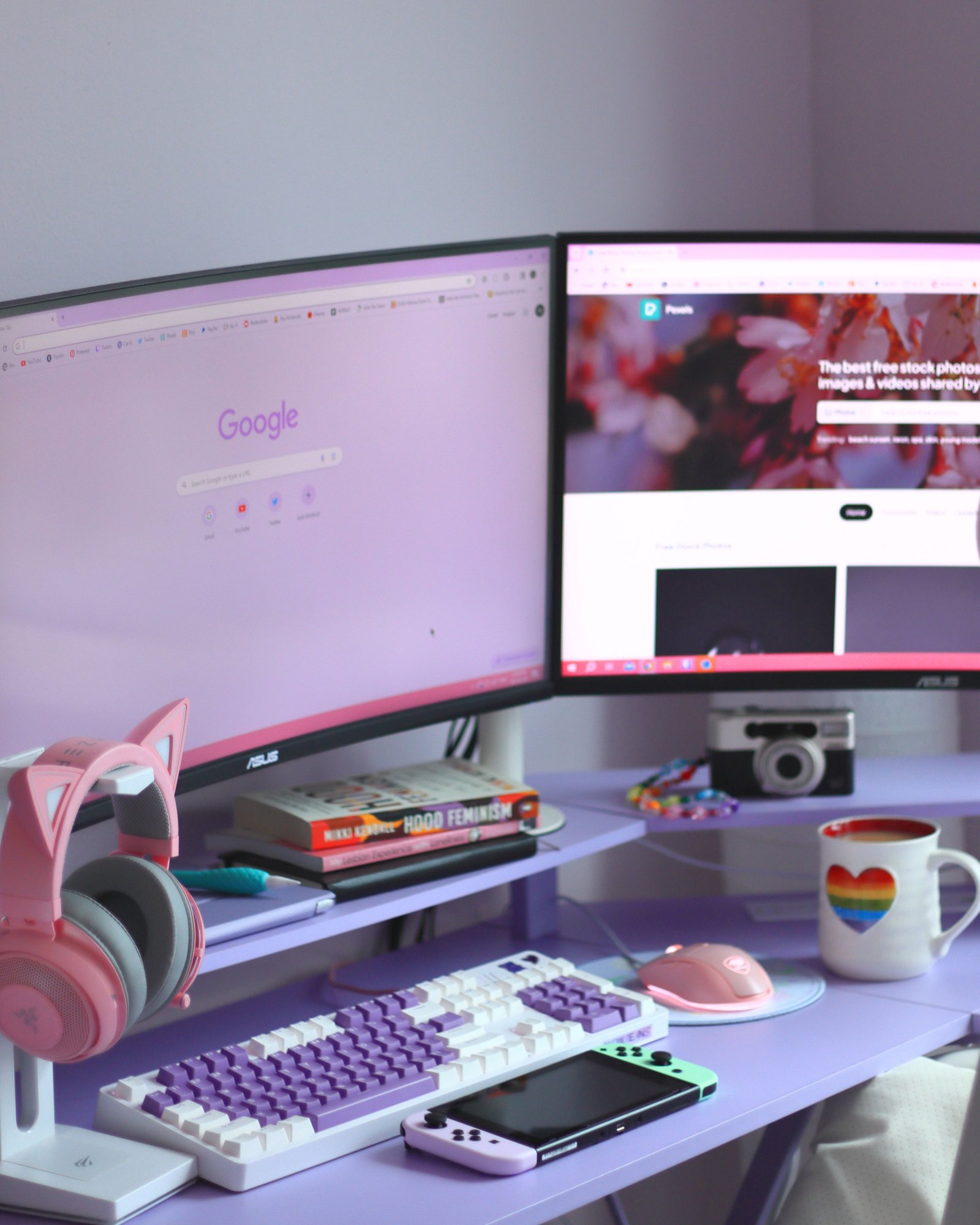
An elegant girly gaming setup does not need to cover every surface in bright pink or decorative accessories. Instead, the most polished spaces use a controlled palette, coordinated equipment, soft lighting, and enough open space for comfortable gaming, studying, or creative work.
The featured setup combines lavender furniture with pink and white accessories. Dual curved monitors provide a practical foundation, while the cat-ear headset, pastel keyboard, pink mouse, and handheld console add personality. Because the larger surfaces remain simple, those smaller details stand out without making the desk appear crowded.
The result feels playful but still organized. More importantly, the setup remains functional enough for gaming, schoolwork, browsing, and everyday use.
Begin With a Refined Color Palette
The easiest way to make a themed gaming setup feel elegant is to limit the number of colors. When every accessory introduces a different shade, the desk can quickly appear disconnected.
The featured space uses three main colors:
- Lavender
- Pastel pink
- White
Black appears only through the monitor screens and thin equipment details. Therefore, it adds contrast without becoming part of the main decorative palette.
A similar setup can use one dominant color, one supporting color, and one neutral. For example:
- Lavender, blush pink, and white
- Dusty rose, cream, and gold
- Pale blue, lilac, and silver
- Soft pink, warm beige, and white
- Mauve, charcoal, and light wood
Choose muted versions of the colors if the goal is a more sophisticated appearance. Brighter shades can still appear through RGB lighting, wallpapers, or one small accessory.
Make the Desk the Main Color Statement
A colored desk immediately establishes the theme because it occupies a large portion of the setup. The lavender desk in the featured image creates a distinctive foundation while allowing the smaller pink accessories to remain visible.
However, buying a colored desk is not the only option. A neutral desk can be transformed with:
- A pastel desk mat
- Colored drawer units
- Removable furniture wrap
- A coordinated monitor shelf
- Painted legs
- A slim decorative panel
- Pastel storage containers
If the desk already has a strong color, keep the wall behind it relatively simple. This prevents the room from competing with the workstation.
The desktop should also provide enough depth for monitors, peripherals, and comfortable viewing distance. Appearance matters, but a narrow desk can make even a beautiful setup difficult to use.
Coordinate the Dual Monitors
Dual monitors make the setup useful for both gaming and multitasking. One screen can display the main game or application, while the other holds chat, music, research, recording tools, or a browser.
The featured monitors have matching curved shapes and thin dark frames. Their consistent design creates symmetry, which helps the colorful desk appear more refined.
For a balanced dual-monitor arrangement:
- Use monitors with similar heights.
- Position the main screen directly in front of the chair.
- Angle the second display slightly inward.
- Keep the gap between the screens narrow.
- Align the top edges when possible.
- Match brightness and color settings.
A dual monitor arm can free space beneath the screens and make alignment easier. In addition, it can hide part of the cable routing behind the monitors.
If matching screens are not available, align their centers and use a coordinated wallpaper to make them feel more connected.
Choose Accessories That Repeat the Palette
The smaller accessories give the setup its playful personality. In the featured design, the pink mouse matches the headset details, while the purple-and-white keyboard connects those accessories to the lavender desk.
The accessories feel coordinated because each one repeats an existing color. Nothing introduces a completely unrelated shade.
Useful coordinated accessories include:
- Keyboard
- Mouse
- Headset
- Headset stand
- Desk mat
- Controller
- Microphone
- Webcam
- Speakers
- Cable clips
- Storage trays
You do not need to replace every item at once. Start with the most visible accessories, such as the keyboard, mouse, and desk mat. Then, add smaller matching pieces over time.
Use a Statement Headset Carefully
The pastel cat-ear headset provides the clearest themed detail in the featured setup. Because it has a distinctive shape, it works almost like décor when displayed on a stand.
A statement accessory is most effective when the surrounding space remains restrained. If the headset, keyboard, microphone, speakers, and chair all use bold shapes, they may compete for attention.
Select one or two playful objects, then keep the remaining equipment simpler. For example, pair a decorative headset with a clean keyboard and plain white speakers.
A headset stand protects the headband, keeps the cable controlled, and prevents the headset from occupying the keyboard area. An under-desk hook offers a quieter option when a clean desktop is more important.
Add Soft Lighting
Lighting has a major influence on the atmosphere of an aesthetic gaming setup. Harsh overhead light can make pastel colors appear flat, while indirect lighting creates depth.
The featured desk receives a gentle pink-purple glow from the screens and nearby lighting. Since the light is soft, it supports the color palette instead of overpowering it.
A layered lighting plan can include:
- Neutral ceiling lighting
- LED light behind the monitors
- A small desk lamp
- Illuminated wall shelves
- A monitor light bar
- Soft RGB lighting beneath the desk
Choose one main accent color at a time. Constantly displaying several bright colors can reduce the elegant appearance, even when every device supports RGB effects.
Warm white light works well with blush, beige, and gold. Meanwhile, cooler white light complements lavender, blue, and silver. Adjustable lighting provides flexibility for both gaming and studying.
Include a Comfortable Chair
A gaming chair occupies more visual space than most desk accessories. Therefore, it should support both the color palette and the user’s comfort.
A white, cream, gray, lavender, or pale pink chair can fit the theme without dominating it. However, color should come after adjustability and support.
Look for:
- Adjustable seat height
- Supportive backrest
- Adjustable armrests
- Suitable seat depth
- Stable base
- Durable upholstery
- Comfortable cushioning
The chair should allow the feet to rest flat on the floor or on a footrest. In addition, the keyboard and mouse should remain close enough for relaxed shoulders.
A decorative cushion can introduce color, although it should not interfere with the chair’s support.
Keep the Desktop Organized
Pastel surfaces show clutter easily, especially when black cables, chargers, and packaging remain visible. Consequently, storage is essential to maintaining the elegant appearance.
Divide the desktop into three zones:
- Display zone: monitors, camera, and speakers
- Control zone: keyboard, mouse, and controller
- Personal zone: mug, books, small décor, or handheld console
This structure keeps frequently used items within reach while preventing them from spreading across the entire desk.
A monitor shelf can add another storage level. Small items may sit beneath it, while a camera or decorative object can be placed above. Nevertheless, keep enough free space for the mouse and keyboard to move comfortably.
Manage Cables in Matching Colors
Cable management makes the greatest difference between a decorated desk and a finished setup. Even expensive accessories can look disorganized when several cords hang beneath the monitors.
Use an under-desk tray to hold the power strip and excess cable length. Then, route the remaining wires along the back edge or down one desk leg.
Helpful accessories include:
- Reusable cable ties
- Adhesive cable clips
- Cable sleeves
- Under-desk trays
- Shorter replacement cables
- Small labels
- A charging dock
White or pastel cable sleeves can blend with a light setup. However, black cables can also disappear effectively when routed behind the monitors or beneath the desk.
Leave enough slack for adjustable monitor arms and devices that need to move.
Add Personal Décor With Restraint
The featured setup includes books, a camera, a colorful mug, and a handheld console. These objects make the desk feel personal, yet they do not cover the entire surface.
Choose décor that reflects the user’s interests rather than adding objects only because they match the color palette.
Possible details include:
- Framed artwork
- Small plants
- Favorite books
- Game figures
- A camera
- Decorative storage boxes
- A coordinated mug
- Wall-mounted controller displays
- One small neon-style light
Group several small objects on a shelf or tray instead of spreading them across the desk. As a result, the main surface will remain easier to clean and use.
Balance Playful and Elegant Details
The combination of playful and refined elements gives this setup its character. The cat-ear headset and pastel console add fun, while the matching monitors and controlled palette keep the overall design sophisticated.
A useful balance is to make large objects simple and smaller objects expressive. For example:
- Simple desk, colorful accessories
- Neutral chair, themed cushion
- Plain wall, decorative shelf
- Matching monitors, playful headset
- Minimal lighting, colorful wallpaper
This approach also makes future updates easier. Accessories can be changed without replacing the desk, cabinets, or other large furniture.
Create an Affordable Version
A complete themed gaming setup can be built gradually. Begin with changes that produce the largest visual effect for the lowest cost.
Start by selecting a wallpaper and matching desktop color theme. Next, add a large desk mat, keycap set, mouse, or cable sleeve in the chosen palette. Afterward, introduce one statement item, such as a headset stand or small lamp.
An affordable update plan might include:
- Clean and reorganize the existing desk.
- Hide visible cables.
- Choose a three-color palette.
- Add a matching desk mat.
- Coordinate the wallpaper and lighting.
- Replace accessories only when necessary.
- Add one or two personal decorations.
Organization and color consistency usually have a greater effect than filling the desk with new equipment.
Final Thoughts
An elegant girly gaming setup depends on balance rather than the number of pink or pastel accessories. A controlled color palette, aligned monitors, soft lighting, comfortable seating, and organized cables provide the foundation.
The featured setup succeeds because lavender, pink, and white repeat across the desk without covering every surface. Meanwhile, the dual monitors, keyboard, mouse, headset, and console keep the space practical.
By making large furniture simple and using smaller accessories for personality, it is possible to create a gaming setup that feels playful, polished, and comfortable for everyday use.