Mack O'reilly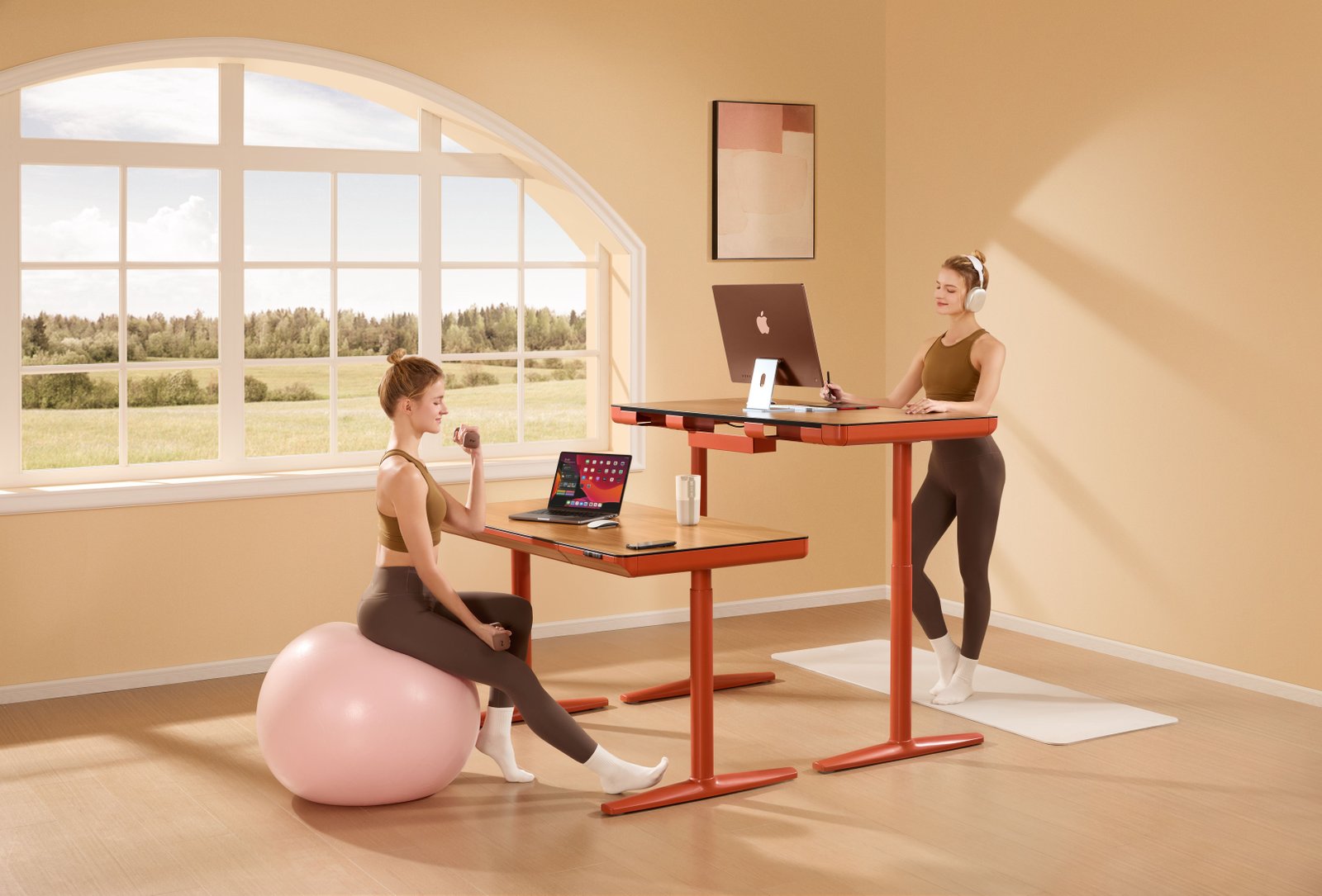
Gaming and computer work can involve long periods in one position. An exercise gaming desk setup creates more opportunities to change posture, stand, stretch, or take short movement breaks without needing a separate home gym.
The featured room uses height-adjustable desks to demonstrate several working positions. One desk sits at standard seated height, while another rises for standing use. In addition, the open floor provides space for a mat, light exercise equipment, and a large stability ball.
However, the goal should not be to exercise intensely while concentrating on a game. Instead, the desk should support separate modes: seated gaming, standing computer use, and movement breaks away from the equipment.
Start With a Height-Adjustable Desk
A height-adjustable desk provides the most flexible foundation because it can move between seated and standing positions. Therefore, the same gaming station can accommodate different activities without requiring two separate desks.
When seated, the desk should allow the shoulders to remain relaxed while the keyboard and mouse stay close to the body. When standing, the surface should rise enough to maintain a similar arm position without forcing the user to lean forward.
Useful standing-desk features include:
- Stable lifting columns
- Enough weight capacity for the equipment
- Smooth height adjustment
- Programmable height presets
- Anti-collision detection
- A spacious desktop
- Built-in cable routing
- A strong monitor mounting area
Stability matters because gaming often involves rapid mouse movements. A desk that shakes at standing height can make the monitor move and reduce comfort.
Before selecting a model, calculate the combined weight of the monitor, computer, speakers, peripherals, and other equipment. Then, choose a desk designed to support that load safely.
Treat Sitting, Standing, and Exercise as Separate Modes
The featured image combines several activity ideas in one room. Nevertheless, the safest and most practical approach is to switch between them rather than trying to perform everything simultaneously.
A useful routine may include:
- Seated gaming or computer work
- A period of standing at the desk
- A short break away from the screens
- Simple movement in the open floor area
- A return to comfortable seated use
Changing position occasionally is more realistic than remaining on an unstable surface or attempting complex exercise while focused on a game.
Pause the game before using weights, resistance equipment, or balance accessories. Furthermore, keep movement activities away from monitors, cables, glass, and other objects that could be damaged.
Preserve an Open Movement Area
An active setup requires clear floor space. The featured room leaves a wide area around the desks, which allows the user to move without striking furniture.
Before adding exercise accessories, check that:
- The door can open fully.
- Desk chairs can roll without obstruction.
- Cables do not cross the floor.
- Equipment remains away from windows.
- There is enough overhead clearance.
- The surface is level and slip-resistant.
- Gaming equipment cannot be knocked over.
A mat can define the movement zone and provide a more comfortable surface. However, it should not curl at the edges or interfere with the desk chair.
Store exercise accessories beside the movement area rather than beneath the user’s feet. A wall rack, low cabinet, or sturdy basket can keep the floor clear when the equipment is not in use.
Choose Supportive Seated Options
A height-adjustable desk does not eliminate the need for a supportive chair. Seated gaming sessions still require stable positioning and comfortable adjustment.
Look for a chair with:
- Adjustable seat height
- Supportive backrest
- Adjustable armrests
- Suitable seat depth
- Stable five-point base
- Smooth casters
- Durable, breathable upholstery
The feet should rest flat on the floor or on a stable footrest. Meanwhile, the backrest should support the user without forcing the shoulders forward.
The featured image also includes a large exercise ball. Although a stability ball can be used briefly for specific activities, it should not replace a properly adjusted chair for long gaming or study sessions. It can roll unexpectedly, and sitting on it while holding weights or focusing on a screen may reduce stability.
Position the Monitor for Both Heights
Monitor placement becomes more complicated when a desk switches between sitting and standing. A position that feels comfortable while seated may become too low after the desk rises.
A monitor arm provides a useful solution because the screen can move independently from the desktop. It also creates more space beneath the display.
Place the primary monitor directly in front of the user. Then, adjust it so the top of the screen sits around eye level or slightly below. The viewing distance should feel comfortable without requiring the user to lean forward.
For a dual-monitor arrangement, mount both displays securely and confirm that the arm can support their combined weight. In addition, leave enough cable length for the desk to reach its highest position without pulling connectors.
Organize the Keyboard and Mouse
Gaming requires precise and repeated hand movements. Therefore, the keyboard and mouse should remain easy to reach in both seated and standing positions.
Keep the elbows near the body and the shoulders relaxed. A large desk mat can define the control area while giving the mouse enough room to move.
If the setup includes a controller, microphone, steering wheel, or other accessories, store anything not currently in use. Otherwise, the desk may become crowded each time its height changes.
An under-desk drawer or side cabinet can hold:
- Controllers
- Headphones
- Charging cables
- Handheld consoles
- Small exercise accessories
- Cleaning supplies
- Spare peripherals
This storage keeps the desktop clear and reduces the chance of an object falling when the desk moves.
Add an Anti-Fatigue Mat
A cushioned standing mat can make standing periods more comfortable on hard flooring. It also creates a clear place for the feet, which can help maintain a consistent position in front of the monitor.
Choose a mat with:
- A non-slip base
- Beveled edges
- Enough space to change stance
- A surface that is easy to clean
- Moderate cushioning
- A shape that fits beneath the desk
The mat should not be so soft that standing feels unstable. Additionally, it should slide or store easily when the chair returns to the desk.
Footwear and floor type also affect comfort. Therefore, the setup may need adjustment rather than relying on the mat alone.
Consider Compact Movement Accessories
Large fitness machines are not necessary for an active gaming room. A few compact items can support movement breaks while remaining easy to store.
Possible accessories include:
- Exercise mat
- Light resistance bands
- Foam roller
- Stable step platform
- Small pedal device
- Massage ball
- Light hand weights
- Stretching strap
Use these items during dedicated breaks rather than while distracted by gameplay. In particular, weights should remain away from the computer and other fragile equipment.
An under-desk pedal device can work during light computer tasks, although it may interfere with precise keyboard or mouse use. Check that the desk has sufficient knee clearance before adding one.
Plan Cable Management for a Moving Desk
Cable management is essential for any gaming station, but it becomes even more important when the desk changes height.
Mount the power strip beneath the desktop so most equipment moves as one unit. Then, leave one controlled cable bundle running from the desk to the wall outlet.
A safe cable system may include:
- Under-desk cable tray
- Reusable ties
- Flexible cable sleeve
- Extra length for full desk movement
- Clips behind the monitor
- Mounted charging hub
- Labeled connections
Test the desk at its lowest and highest settings before placing valuable equipment on it. Watch every cable as the surface moves and confirm that nothing stretches, catches, or enters the lifting mechanism.
Keep cords out of the movement area. Otherwise, they can become a tripping hazard during breaks.
Use Lighting for Gaming and Movement
The room needs enough light for both screen use and safe movement. Soft background lighting may create an enjoyable gaming atmosphere, but it should not be the only illumination available.
Use several light sources:
- General ceiling lighting
- Bias lighting behind the monitor
- Adjustable desk lighting
- Natural daylight
- Brighter room lighting for movement breaks
The featured room receives generous daylight from a large window. As a result, the space feels open and suitable for several activities.
However, direct sunlight can create screen glare. Blinds or curtains allow the user to control brightness without darkening the entire room.
Keep Water Away From Electronics
A drink should remain accessible during longer computer sessions, but it should have a stable place away from the keyboard and computer.
Use a closed bottle or a cup with a secure lid. A desk-mounted cup holder can keep drinks off the main surface while preventing accidental spills.
Similarly, place towels, sprays, and other exercise-related items away from electronics. Keeping the gaming and movement zones organized separately reduces avoidable accidents.
Create a Calm Multipurpose Design
An active gaming room does not need to resemble a commercial gym. The featured space uses warm beige walls, natural wood, a muted red desk frame, and minimal artwork. Consequently, the equipment feels integrated into the room rather than added as an afterthought.
To create a coordinated design, repeat one or two colors across:
- Desk frames
- Exercise mat
- Storage containers
- Artwork
- Headphones
- Chair details
- Small accessories
Closed storage can hide exercise equipment when it is not in use. Meanwhile, the open floor allows the room to change functions without moving large furniture.
Make Changes Gradually
An exercise gaming desk setup can develop over time. Begin with the furniture and organization changes that improve both comfort and safety.
A sensible order is:
- Clear the floor and organize existing cables.
- Adjust the chair and monitor.
- Add a height-adjustable desk if needed.
- Install an under-desk cable tray.
- Add a standing mat.
- Create a separate movement area.
- Introduce only the accessories that will be used regularly.
This gradual approach prevents the room from becoming crowded with equipment that does not fit the available space.
Final Thoughts
An exercise gaming desk setup works best when it encourages changes in position rather than constant exercise at the computer. A height-adjustable desk supports both sitting and standing, while an open floor area makes short movement breaks easier.
The featured room succeeds because it combines adjustable desks, natural light, organized equipment, and enough free space for different activities. However, seated gaming, standing computer use, and exercise should remain separate modes.
By prioritizing desk stability, supportive seating, secure monitor placement, controlled cables, and clear walkways, a gaming room can become more flexible without losing comfort or function.